Here’s the thing: every WordPress website needs PHP extensions. While some of them come enabled by default, others, though highly recommended, don’t. And honestly, it makes sense: your server can’t magically guess which extensions your site is going to need.
We’ve been there too, wondering which PHP extensions are required for WordPress. And with dozens of extensions and various PHP versions to navigate, it can feel like a maze.
More so, we couldn’t find any reliable, one-stop resource on this topic floating around the internet. I mean, seriously, there are official WordPress recommendations and technical info about PHP extensions, but where’s the hands-on testing and real-world experience?
So we packed away the surfboards rolled up our sleeves, did some testing, and dug into the research on PHP extensions needed for WordPress. As Hercules once said: “I am the hero you need”.
In this article, you’ll find out which PHP extensions to enable to make your WordPress site hit as hard as prime Mike Tyson.
Before we begin, here’s a simple chart to show how PHP extensions and WordPress work hand in hand:
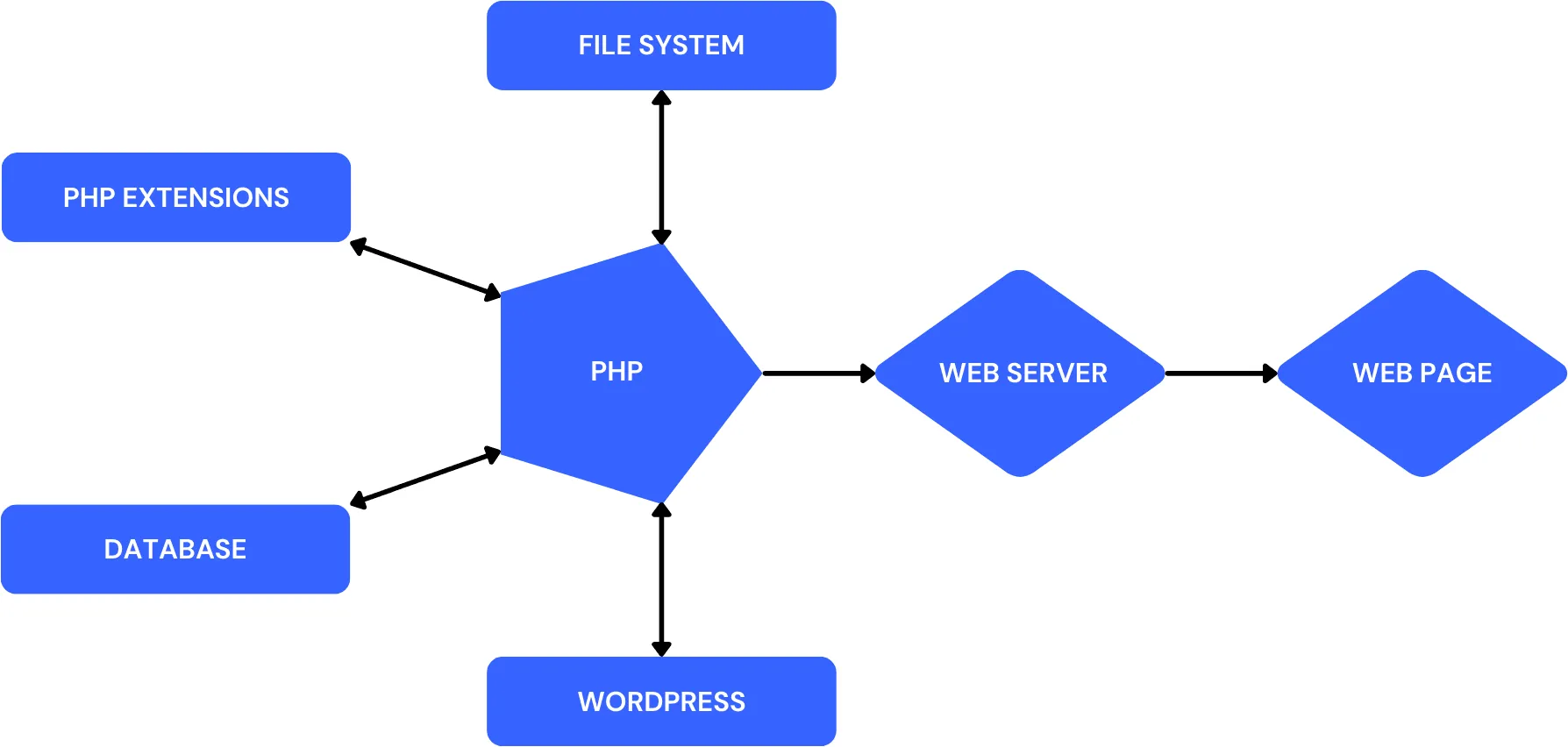
We’ll dive deeper into what PHP extensions are and why they’re needed for a WordPress site.
Then, we’ll take a look at the official WordPress guidelines for must-have PHP extensions.
The last but not least – a special dessert awaits you. We’ll show you our own PHP dashboard with the PHP extensions we’ve used and recommend for different PHP versions.
And just so you know, we’ve been providing web design services for 8 years now, so we tried many options. Our team also manages over 50 WordPress sites here at Web Aloha – everything from simple one-pagers to multilingual WooCommerce stores. So we’re not just talking the talk – we’re walking the walk actively using this knowledge on our own sites.
Let’s explore the connection between PHP extensions and WordPress – a partnership that keeps your site running smoothly.
What are PHP Extensions and why WordPress needs them?
PHP extensions are like little power-ups for your server. They plug into PHP (the language WordPress runs on) and add all kinds of extra features.
WordPress is built to handle lots of tasks, from displaying content to processing images or running plugins. But it doesn’t do all of this on its own. PHP and its extensions take care of the heavy lifting.
Some extensions handle plugins or themes, others focus on security, and a bunch help your WordPress site do the things like:
Image handling: Extensions like GD Library or Imagick make it possible to resize, crop, and optimize images for your site.
Secure connections: OpenSSL ensures secure communication, like encrypting data for HTTPS.
Database interactions: Extensions like mysqli or PDO_MYSQL manage all the back-and-forth between WordPress and your database.
Without the right PHP extensions, your site might not perform at its best, think slower speeds, missing features, or even errors.
And according to Think with Google, the likelihood of a user bouncing increases by 32% as page load time rises from just 1 second to 3 seconds. Website speed is also a major ranking factor which is important for SEO optimization. So yep, you don’t want a slow website.
Bottom line: PHP extensions make your WordPress site faster, safer, and fully equipped with all the tools it needs to thrive in the digital jungle. Want to see how fast your site is right now? Run it through our website performance checker and get a baseline before making any changes.
PHP Extensions Required by WordPress
The official WordPress server environment guidelines are pretty clear, some PHP extensions are essential to keep your site grooving. Let’s see which of them you need to keep enabled to make sure your WordPress site powers through like an Ironman.
Must-have PHP Extensions for WordPress
- json: Handles JSON data, critical for working with the REST API.
- mysqli or mysqlnd: Manages communication between WordPress and MySQL databases.
Highly Recommended PHP Extensions:
- curl: Handles remote requests, allowing WordPress to connect with external servers.
- dom: Assists with validating text widgets and configuring certain servers like IIS7+.
- exif: Reads image metadata, enhancing how media is managed.
- fileinfo: Identifies file types for uploads, ensuring proper handling and security.
- hash: Generates unique hashes, supporting data security and verification.
- imagick: Powers advanced image processing, making media management more efficient.
- igbinary: A more efficient way to serialize data in PHP (often used for caching). It can help object caching tools store data faster and lighter.
- intl: Adds important features like locale-aware formatting and better handling of different languages. Super handy for multilingual sites.
- mbstring: Enables handling of multi-byte strings, ensuring support for non-ASCII characters and international text.
- openssl: Secures data transmission, vital for HTTPS connections. You can verify yours is configured properly with our SSL certificate checker.
- pdo_mysql: Provides a consistent way to interact with databases, improving database communication.
- xml: Processes XML, allowing WordPress to handle XML data smoothly.
- zip: Supports creating and extracting compressed files, useful for installing themes and plugins.
Which PHP Extensions to Enable for WordPress
As we mentioned, Web Aloha manages WordPress sites of all shapes and sizes. Below, you’ll find the PHP extensions setup we’ve been using over the past few years. And if they work seamlessly across all our clients’ sites, they’re bound to work for you too.
Note: each PHP version comes with its own set of extensions.
By the way, if you’re not sure what PHP version your site is running, use our online PHP Version Checker.
Since the latest PHP 8.5 is fully compatible with WordPress, it’s what we’re running on our sites right now. But we’ll go beyond the latest PHP version. So even if you’re sticking with an older PHP for now – we’ve got your back!
PHP 8.5 Extensions for WordPress
Wanna thrive in the digital jungle? You’ve gotta keep your claws sharp and your brain up-to-date. PHP 8.5 is the newest, sharpest, and smartest version around. And we’ve already covered why PHP 8.4 is recommended PHP version for WordPress in 2026. That’s why we recommend all WordPress site owners upgrade and start taking full advantage of what PHP 8.5 has to offer.
By the way, we’ve also done the research and extensive testing on PHP 8.5 and WordPress compatibility. Long story short – they go together perfectly, like cold coconut water and a hot day.
So if you’re one of those “smart guys next door” planning to upgrade to the latest PHP version – congrats! We’re already rocking PHP 8.5 on over 50 of WordPress websites. Not sure what tech your site is running? Our website technology checker can show you the full picture. Here’s our handpicked list of recommended PHP 8.5 extensions for WordPress:
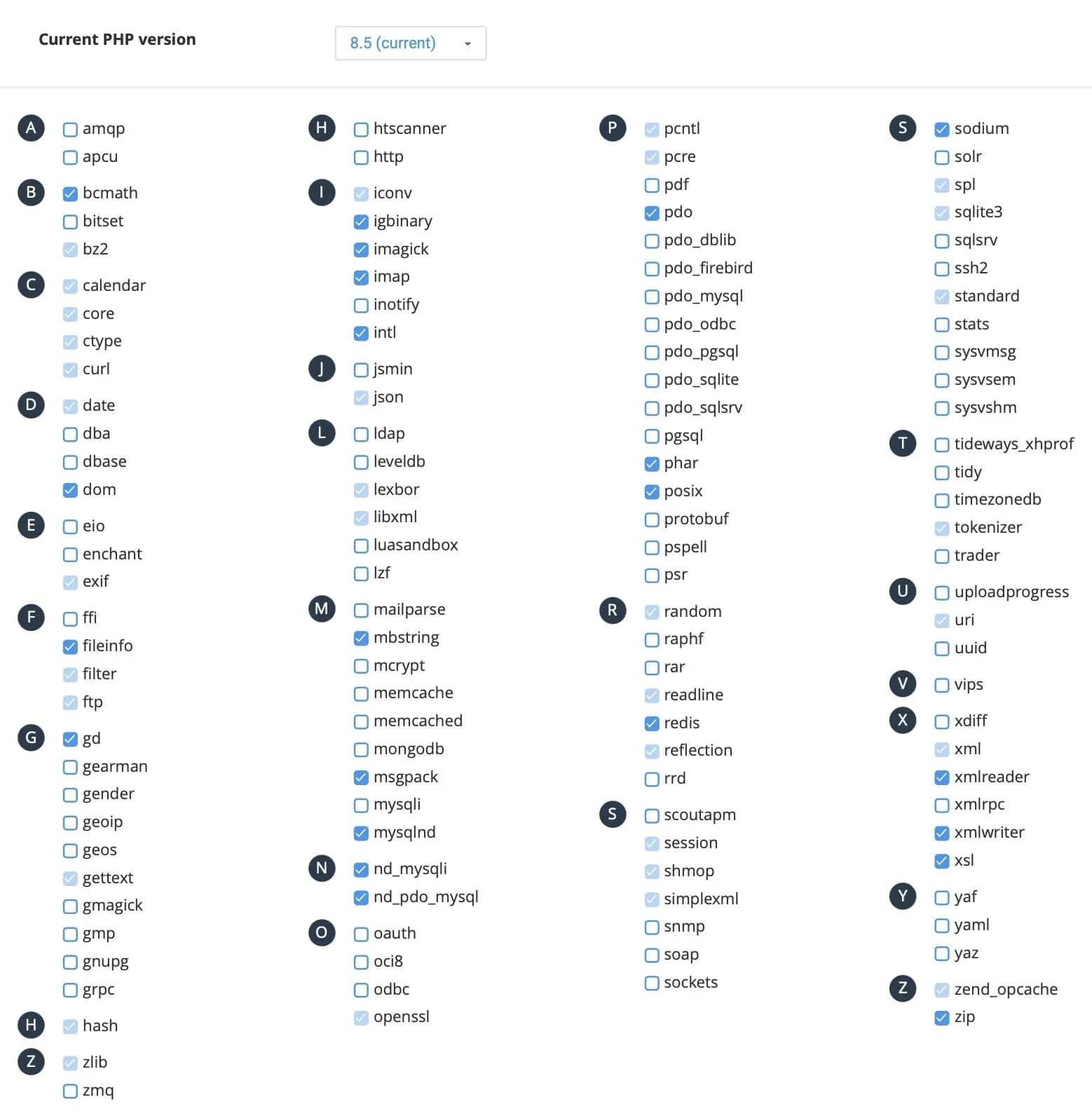
If you’re using Memcache for object caching on your website, enable it instead of Redis. However, if you’re not using any object caching at all, keep both Redis and Memcache PHP extensions disabled. Curious what plugins are handling caching on your site? Our WordPress theme and plugin detector can show you the full stack.
PHP 8.4 Extensions for WordPress
Not ready for the newest version of PHP? No worries – PHP 8.4 is still a solid choice. While it might not be the absolute best option anymore, it’s very stable and packed with great features. Plus, it’s actively updated and supported until late 2026.
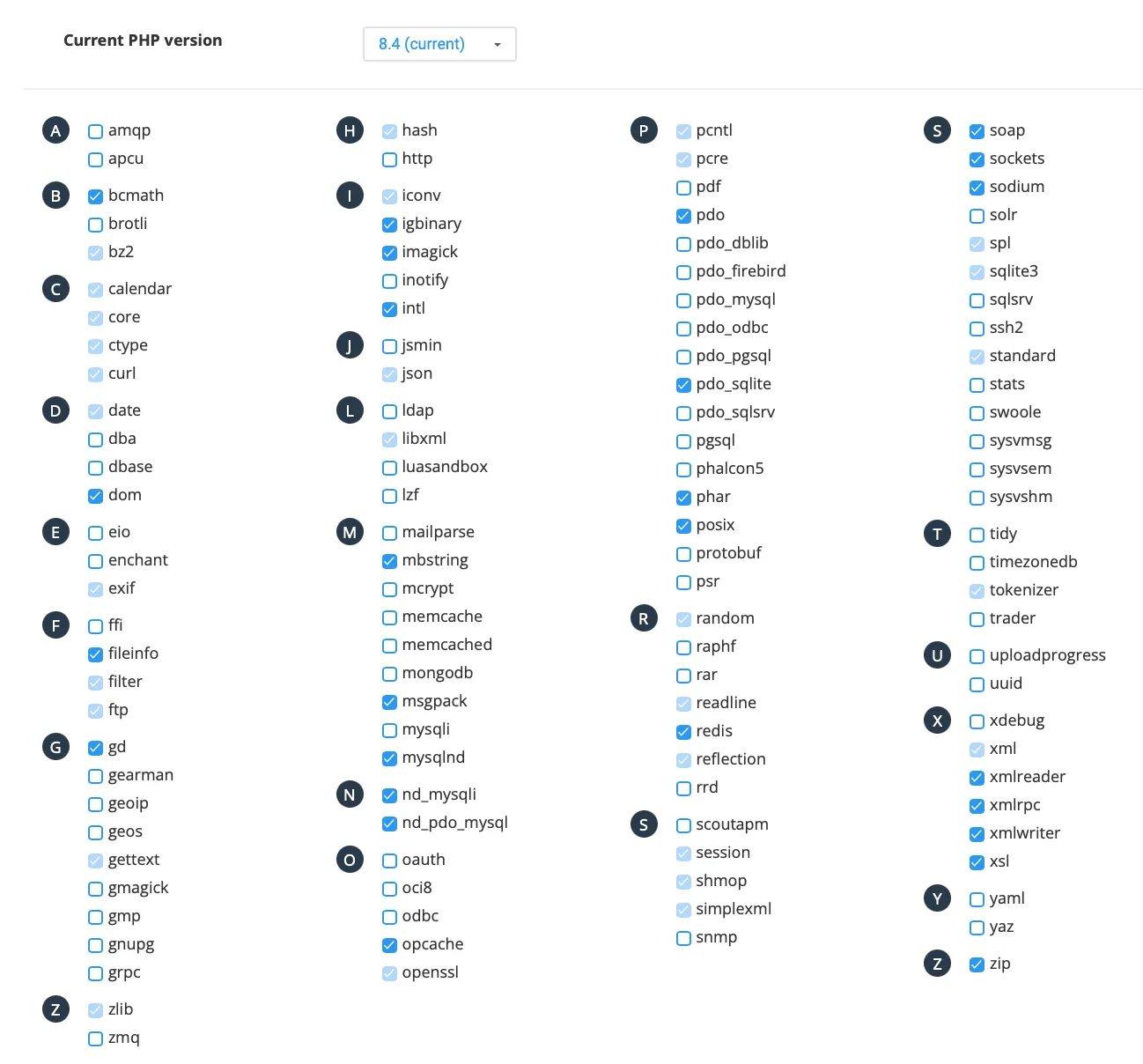
We’ve used PHP 8.4 across our WordPress sites for a whole year, and it served us well. More so, we’ve covered how compatible are PHP 8.4 and WordPress, in case you’re wondering. Here’s our recommended PHP 8.4 extensions setup for WordPress:
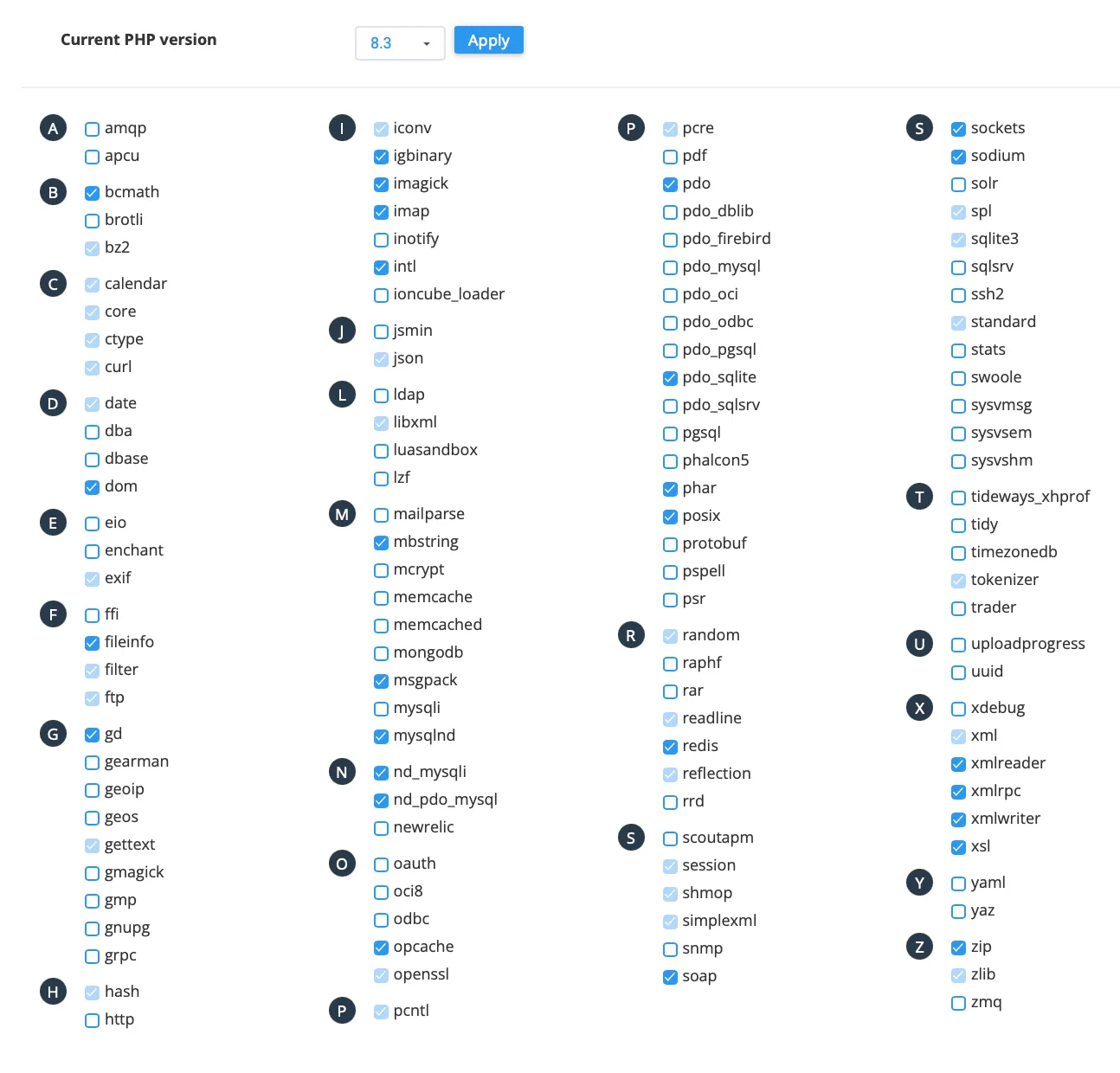
PHP 8.3 Extensions for WordPress
PHP 8.3 is no longer actively updated, but it still receives important security patches from the official developers. That said, we’re all about staying ahead, so we recommend moving your WordPress site to a newer PHP version.
But hey, if upgrading isn’t on the table just yet, below is the list of our recommended PHP extensions for 8.3 version:
PHP 8.2 Extensions for WordPress
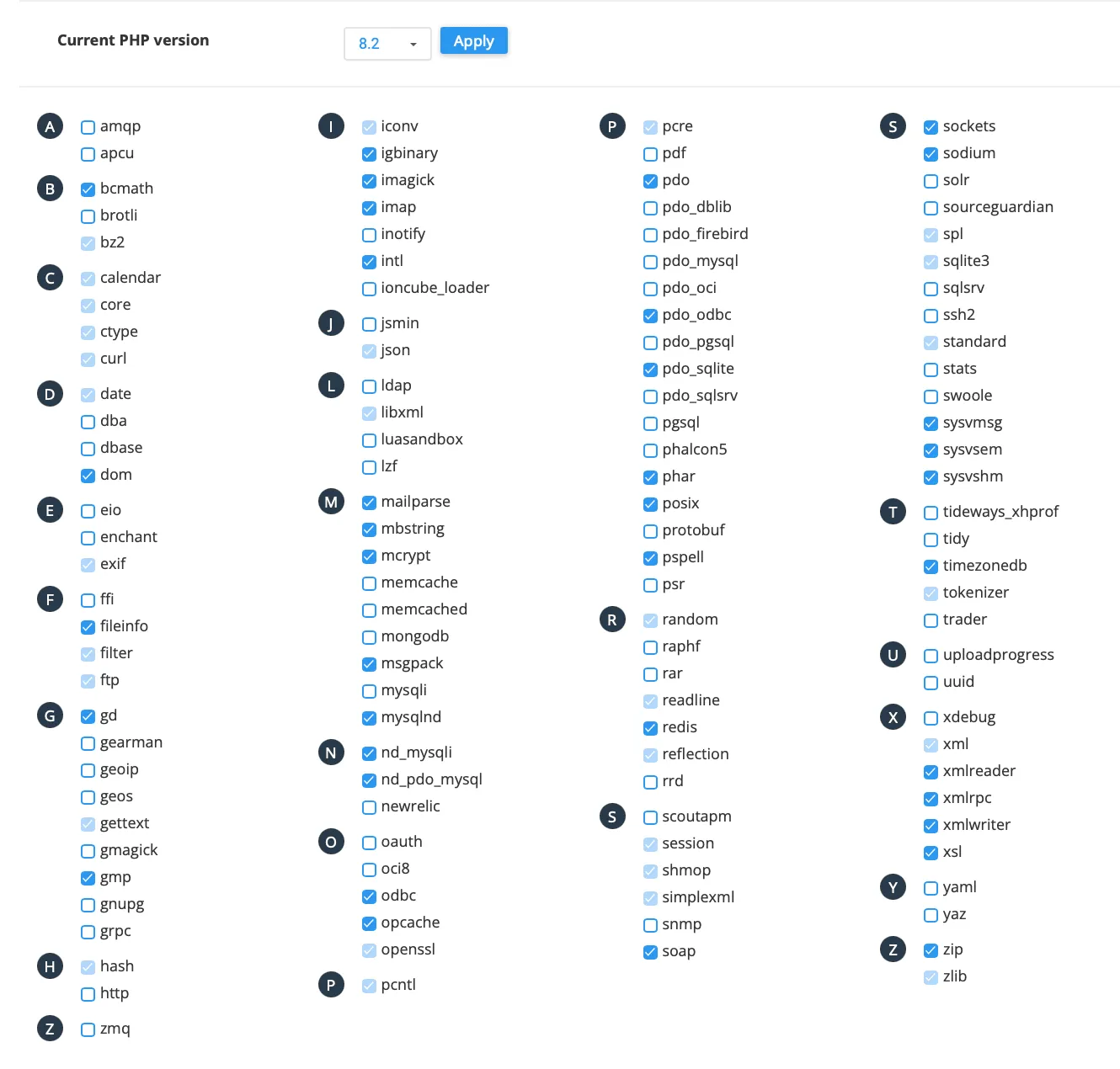
We don’t recommend using any PHP version older than 8.2. Why? Well, this is the oldest version that still gets the security updates – and even that only lasts until late 2026.
PHP extensions we used on our WordPress sites while running PHP 8.2:
PHP 8.1 Extensions for WordPress
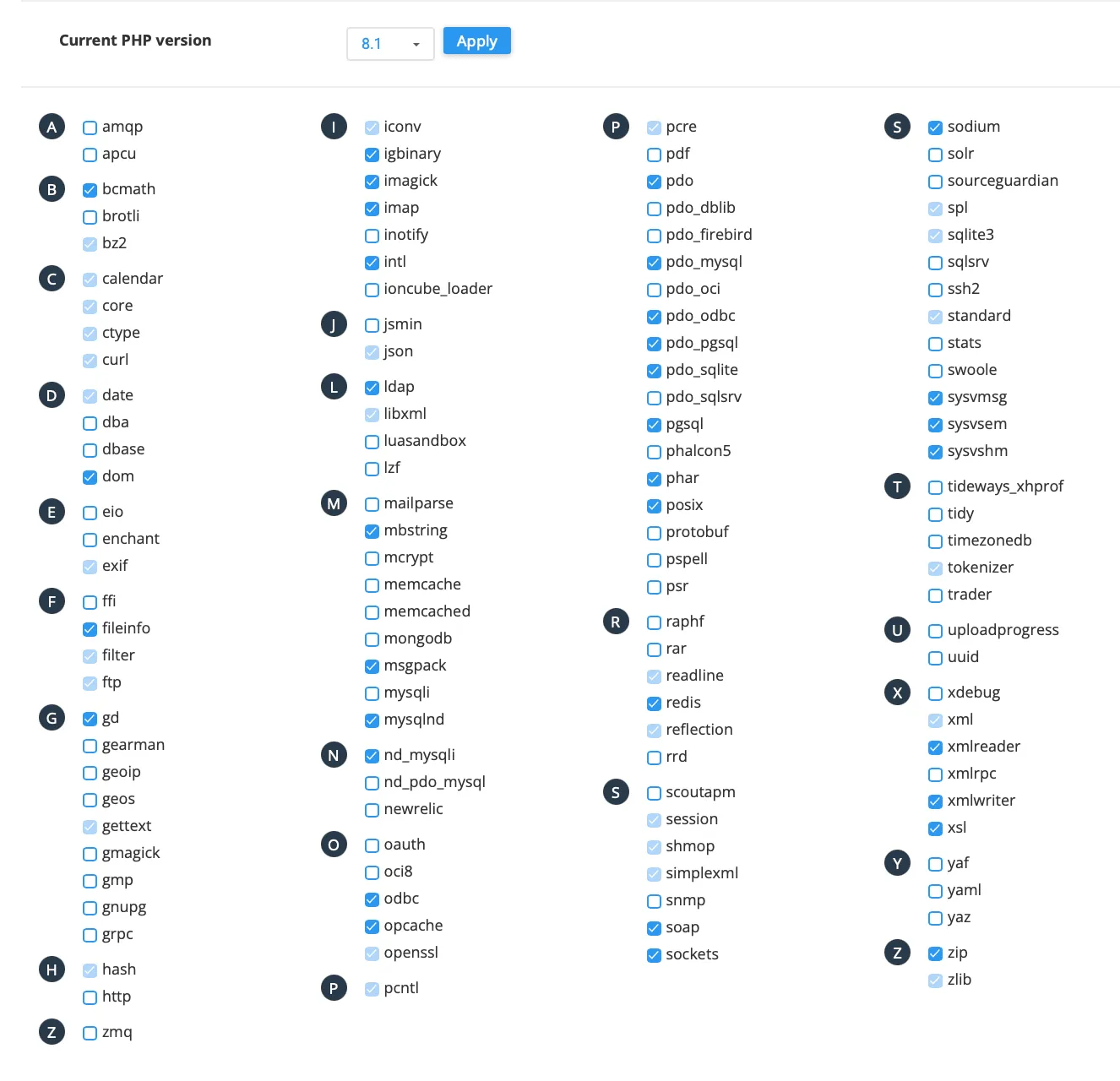
PHP 8.1 in an outdated version that dos not receive security updates anymore. If you can’t use at least PHP 8.2, you might want to talk to a professional developer. Seriously, get in touch, and let’s make your WordPress site great again. 💪 While you’re at it, check your security headers, sites stuck on old PHP usually have weak server configurations too.
If you have no choice, at least enable the right PHP 8.1 extensions:
Enabling PHP Extensions for WordPress
PHP extensions are a server-side thing, meaning you’ll need to tweak some settings on your hosting to get them working.
If you’re using cPanel, we’ve got you covered with a quick step-by-step guide below. But if your server runs on something else, it’s best to reach out to your web host, as the process can vary depending on your hosting setup. And you don’t want to screw anything up on your server, right? 😏
Enabling PHP Extensions in cPanel
- Log in to cPanel Head over to your hosting provider’s cPanel and log in.
- Open “Select PHP Version” Scroll down to the Software section and click Select PHP Version.
- Choose Your PHP Version Check your current PHP version at the top. If needed, switch to a compatible version (WordPress runs best on PHP 8.3 or later).
- Enable PHP Extensions You’ll see a list of available PHP extensions below. Simply tick the checkboxes for the ones you need, then hit Save/Apply.
Remember – enable only PHP extensions that are needed for your WordPress site.
Why not just Enable all PHP Extensions?
We’ve had this smart question too. 😎
And while enabling all PHP extensions might seem like a clever shortcut, it can actually lead to issues:
Performance Impact: Each active extension consumes resources. Enabling unnecessary extensions can slow down your server, affecting your WordPress site’s speed and responsiveness.
Security Risks: Unused extensions can introduce vulnerabilities. Keeping only the necessary extensions active minimizes potential security threats. You can audit your server’s security posture with our DNS lookup tool and security headers checker.
Server Issues: Some extensions may not play well together, leading to compatibility issues or unexpected behavior on your WordPress site.
I mean, you wouldn’t use a kuvalda to hammer in a bunch of nails, right? It’s all about using just the right tool for the job, not the whole toolbox.
The takeaway? Only enable the extensions your site actually needs. This approach ensures optimal performance, security, and a more stable server environment.
Summary: WordPress Requires some PHP Extensions
Now you know what PHP extensions are, why WordPress needs them, and which ones you should enable to keep your site flowing. After configuring your extensions, give your site a quick health check, verify your meta tags, run a broken link check, and make sure your headings are structured properly.
Plus we gave you a behind-the-scenes look at our PHP dashboard, showing the extensions we use on WordPress sites that we manage.
Remember, enabling unnecessary extensions is a no-no, so stick to what is needed. Also, keep your PHP version updated for the best website performance. Drop us an Aloha if you need any help with your WordPress website!
PHP Extensions for WordPress: FAQ
What are PHP extensions?
PHP extensions are add-ons that give PHP extra capabilities. They handle things like database connections, secure encryption, API requests, XML processing, image manipulation, and file compression. WordPress relies on several extensions to run reliably, and many plugins depend on them too.
Which PHP extensions are required for WordPress?
WordPress needs a baseline set of PHP extensions for core functionality: database communication, data formats, and server operations. If one of these is missing, you can see Site Health warnings, broken features, or failed installs and updates. The safest approach is to follow the official WordPress requirements, then compare them to what’s enabled on your server.
Which PHP extensions are recommended for WordPress?
Recommended extensions may not be strictly required, but they unlock key features and improve stability. Examples include extensions used for HTTP requests, encryption, multibyte text handling, XML processing, and ZIP support. Check the “recommended by version” lists in this article and ensure your server matches them.
PHP extensions vs PHP modules: what's the difference?
In most hosting dashboards, “PHP modules” and “PHP extensions” refer to the same thing: optional components loaded into PHP. Some panels call them modules, while documentation often says extensions. If you’re checking cPanel or Plesk, you’ll usually see the word “modules,” but the meaning is the same.
Which PHP extensions improve WordPress performance?
The biggest performance wins typically come from OPcache (bytecode caching), object caching extensions like Redis or Memcached (when you actually use object caching), and efficient image processing via Imagick or GD. ZIP support also matters for smoother plugin/theme installs and updates. Enable what you need, avoid unnecessary extras, and pair extensions with the right server setup. After configuring extensions, benchmark your site with our website performance checker to see the real impact.
Does WooCommerce need additional PHP extensions?
WooCommerce uses the same core PHP extensions as WordPress, but some become more important at scale. For example, intl helps with currency and locale formatting, mbstring can matter for multilingual product data, and object caching (Redis/Memcached) becomes a real advantage as your catalog and traffic grow. If you run a store, make sure the recommended set is enabled, not just the minimum.
How do I check which PHP extensions are enabled on my server?
You can check enabled extensions in a few ways: in WordPress (Tools → Site Health → Info), in your hosting control panel (for example cPanel’s “Select PHP Version”), or via a phpinfo() output file if your host allows it. If results don’t match, you may be looking at a different PHP handler or a different PHP version than your site is actually using. You can also use our PHP version checker to confirm which version is actually running.
How do I enable PHP extensions for WordPress?
It depends on your hosting. In cPanel, go to Software → Select PHP Version, choose your active PHP version, then tick the extensions you need. In Plesk or custom servers, it’s handled in PHP settings or via packages. If you’re unsure, ask your host, and avoid experimenting blindly on a live production site (use staging when possible).
Do PHP extensions differ by PHP version?
Yes. Different PHP versions can change extension availability, defaults, or even naming. Each time you switch PHP versions, double-check your enabled extensions and verify your site after the change. A PHP upgrade without matching extensions is a common cause of “mystery” breakage.
What happens if a required PHP extension is missing?
Typically one of three things happens: WordPress flags it in Site Health, a plugin feature breaks, or installs/updates fail. Sometimes it’s obvious, sometimes it’s subtle (for example, failed API requests, weird formatting, or image processing issues). The fix is usually to enable the missing extension for the PHP version your site actually runs on.
Can I just enable all PHP extensions?
It’s not recommended. Some extensions are irrelevant to WordPress, some overlap, and some can introduce extra attack surface or conflicts. Enable what your WordPress setup actually needs, keep it lean, and you’ll usually get better stability, security, and performance.