A service business
Map service pages, project galleries, local details and enquiry forms. Wellington House Repiling’s migration delivered 14 pages, including six dedicated service pages.
See the service-site migration →
SAY ALOHA TO
Preserve the site you already own while changing its platform: inventory content, map URLs, migrate media and metadata, validate parity, launch redirects, and monitor the cutover.
Measured Performance Upgrade
We compare representative pages before and after migration. The result depends on content, scripts, integrations, and hosting.
Smaller Runtime Surface
Static pages remove the public WordPress database, admin, and plugin runtime. Integrations and hosting still receive appropriate security controls.
SEO Migration Controls
We map URLs, redirects, metadata, schema, images, and internal links, then monitor after launch. Rankings cannot be guaranteed.
Free migration audit included.
WordPress vs Astro, side by side.
The acceptance criteria are source-to-rendered content coverage, intentional URL outcomes, matching titles and canonical signals, migrated structured data and media, working internal links, tested forms, and a reversible launch plan. Starting a new Astro site without an existing WordPress estate to preserve? Choose custom Astro website design instead.
Map service pages, project galleries, local details and enquiry forms. Wellington House Repiling’s migration delivered 14 pages, including six dedicated service pages.
See the service-site migration →Inventory articles, categories, media and current search landing pages. Agree which URLs stay, which redirect, and which retire; test those outcomes before cutover.
Start a redirect inventory →List checkout, memberships, booking, search and editing needs first. Decide what stays in the existing platform and what needs a replacement before committing to Astro.
Check migration fit →Evidence you can inspect: Gridinta’s published GTmetrix reports show homepage LCP changing from 2.4 seconds on WordPress to 477 milliseconds on Astro. Tests ran from London on 4 and 7 August 2026 using Chrome 142 and Lighthouse 12.6.1. These are dated lab observations for that rebuild; we agree and measure targets for your own site.
Send your current URL, the pages that generate enquiries, and any essential integrations. We’ll confirm fit, what needs preserving, and the next step.
Discuss my migration →Mapped
URLs and redirects
Compared
Pre/post parity checks
Monitored
Post-launch signals
WordPress is flexible, familiar, and supported by a large ecosystem. Over time, some sites accumulate plugins, theme code, and operational overhead that no longer fit what the business needs.
Themes, plugins, database work, updates, and hosting choices can add runtime or operational overhead. The scale of that overhead depends on the individual WordPress implementation.
For suitable content-led sites, Astro can generate static HTML and ship client-side JavaScript only where it is needed. That can remove the public WordPress runtime while retaining explicitly mapped forms, analytics, search, commerce, and other integrations.
We have built 90+ websites across platforms over 8+ years, including deep WordPress work. That experience helps us distinguish a migration that reduces operational burden from one that would discard useful CMS capabilities.
This comparison shows the implementation goals we validate for an in-scope migration. The actual baseline and outcome depend on the source site, selected integrations, content, hosting, and approved migration plan.
| Your WordPress site | After Astro migration | |
|---|---|---|
| Page load | Measured before migration | Measured against an agreed budget |
| Lighthouse (mobile) | Baseline recorded | Representative pages tested |
| JavaScript shipped | Measured on source pages | Budgeted per template and integration |
| AI search & citations | Source rendering checked | Primary content in server-rendered HTML |
| Security surface | Database + login + plugins to patch | Reduced for static pages; integrations remain |
| Maintenance | Core, theme, plugin & PHP updates | Dependencies and integrations still maintained |
| Hosting | Depends on the managed WordPress plan | Depends on traffic and integrations |
Want the full breakdown? Read WordPress vs Astro for business.
The agreed pages, posts, images, and downloads are inventoried and transferred to the selected Astro content structure.
We preserve suitable URLs or add 301 redirects for approved changes, then validate the map to reduce avoidable migration risk.
In-scope titles, descriptions, schema, Open Graph data, sitemaps, and robots directives are mapped, transferred, and checked.
Contact forms, email signups, analytics, CRM connections. We replace WordPress plugins with lightweight, modern alternatives.
We can keep your existing brand look or give your site a complete visual refresh with a modern, fast Astro design.
We add agreed AI-readiness signals such as llms.txt, structured data, and server-rendered content architecture without promising citations or recommendations.
Migration is a useful opportunity to improve website content. Existing WordPress pages might have outdated copy, weak search intent, or content that no longer represents the business well.
We can migrate your content as-is, or rewrite it with fresh, SEO-optimized copy that works for both Google and AI search engines.
Either way, the agreed content is rebuilt on a leaner delivery foundation and measured against the migration's performance, parity, and security requirements.
We analyze your current WordPress site, its content, URL structure, SEO performance, plugins, and hosting to plan the migration.
We inventory in-scope pages, posts, images, and URLs, then map them to the new Astro structure so gaps can be identified before launch.
We redesign your site on Astro with a modern, fast layout. We can keep your existing content or rewrite it with fresh, SEO-optimized copy.
We build your new site with clean HTML, minimal JavaScript, optimized images, and agreed performance and accessibility budgets.
We test in-scope routes, add 301 redirects where URLs change, and compare status, canonicals, titles, H1s, schema, images, and internal links before launch.
We deploy your new Astro site to a global CDN, monitor rankings and traffic for the first weeks, and ensure a smooth transition.
Every migration package includes content transfer, URL preservation, 301 redirects, SEO setup, and deployment to a global CDN.
No hidden fees. Content rewrite and headless CMS integration are optional add-ons.
For small WordPress sites with up to 5 pages and no blog.
$999
Delivery within 7 days.
For business sites with multiple pages and a blog.
$1499
Everything in Simple, plus:
Delivery within 14 days.
For large WordPress sites that need a full rebuild on Astro.
$2499
Everything in Business, plus:
Delivery within 21 days.
We migrated Wellington House Repiling (wellingtonhouserepiling.co.nz) from WordPress to Astro. Here are the Google PageSpeed Insights scores (mobile) before and after.
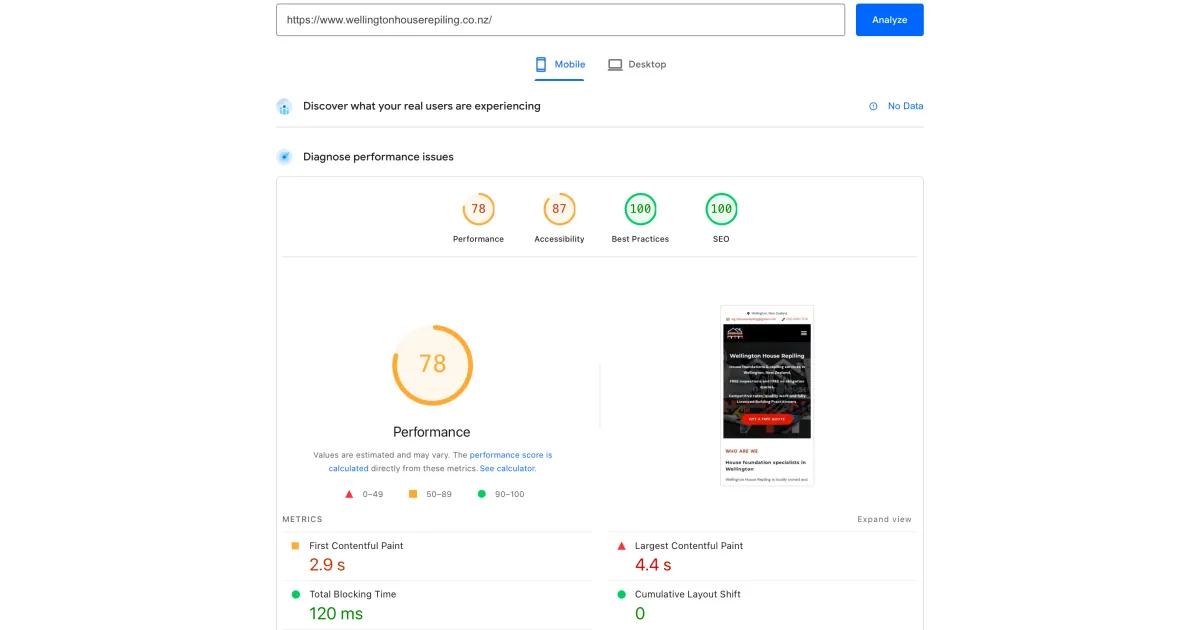
Performance
78
Accessibility
87
First Contentful Paint
2.9 s
Largest Contentful Paint
4.4 s
Total Blocking Time
120 ms
Cumulative Layout Shift
0
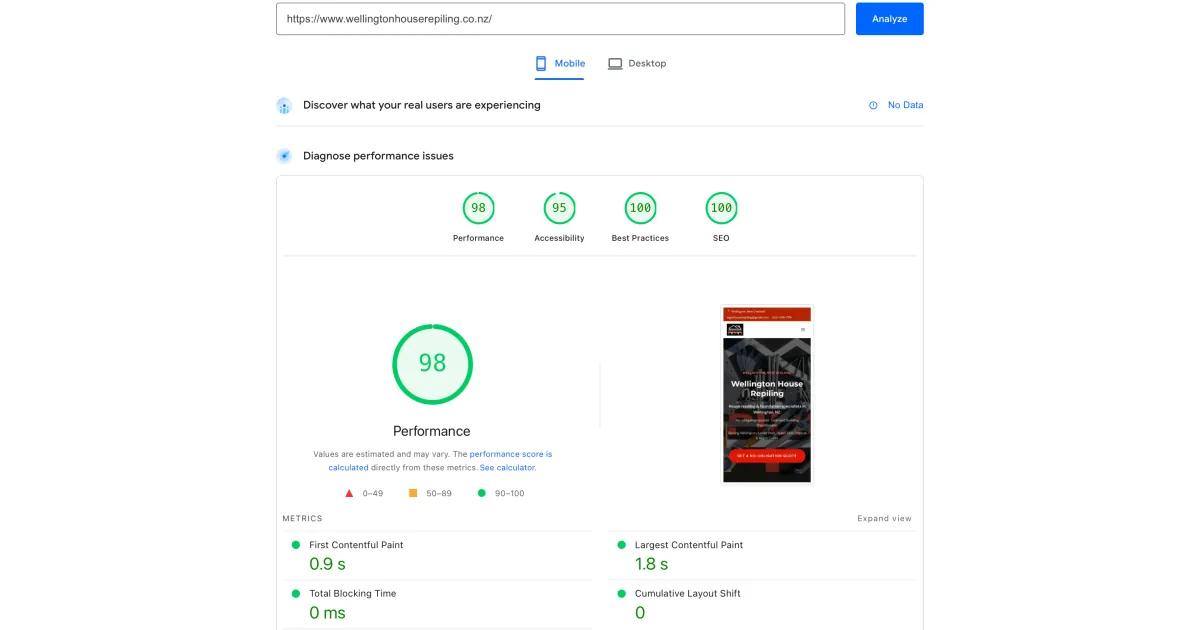
Performance
98
Accessibility
95
First Contentful Paint
0.9 s
Largest Contentful Paint
1.8 s
Total Blocking Time
0 ms
Cumulative Layout Shift
0
Performance jumped from 78 to 98. Page load dropped from 4.4s to 1.8s LCP. Total Blocking Time hit 0 ms. Same content, same domain. Just rebuilt on Astro.
Source: Google PageSpeed Insights · Mobile · wellingtonhouserepiling.co.nz
Read the full case study: Wellington House Repiling →Speed, AI visibility, and smart web strategy are at the core of what we do. Read our real-world insights on building websites that perform.
A clear next step
Send the current WordPress URL and the outcomes you need to preserve. We will review content volume, URL risks, functionality, and the evidence required for a safe cutover.
A migration quote follows the inventory and risk review; redirects and parity checks are part of the scope.