Is WordPress compatible with the latest PHP 8.5? Like every year, we were curious. And like every year, we’re among the first digital agencies to actually test real WordPress websites on PHP 8.5.
First, we switched a few of our WordPress sites to PHP 8.5. Guess how many fatal errors we got? Yep – zero. Then we switched more complex sites and tested those too. Rinse and repeat.
So after testing PHP 8.5 on over 50 real WordPress websites, here’s our final answer:
The latest WordPress version is fully compatible with PHP 8.5. That includes WooCommerce and many popular WordPress plugins.
To be clear: at Web Aloha, we’re not “testing” PHP compatibility on a fresh WordPress install with a default theme. Honestly, who needs that? That’s like testing a car by turning the engine on and off and calling it a day.
In this article, you’ll see real-life examples. That means real WordPress websites owned by real businesses, plus a list of plugins that work fine with PHP 8.5. If you want to check what tech stack any site is running, our website technology checker can help.
And for dessert, we’ll break down why upgrading your WordPress site to PHP 8.5 is absolutely worth it, especially in 2026.
But first, a quick glance at the Web Aloha WordPress dashboard:
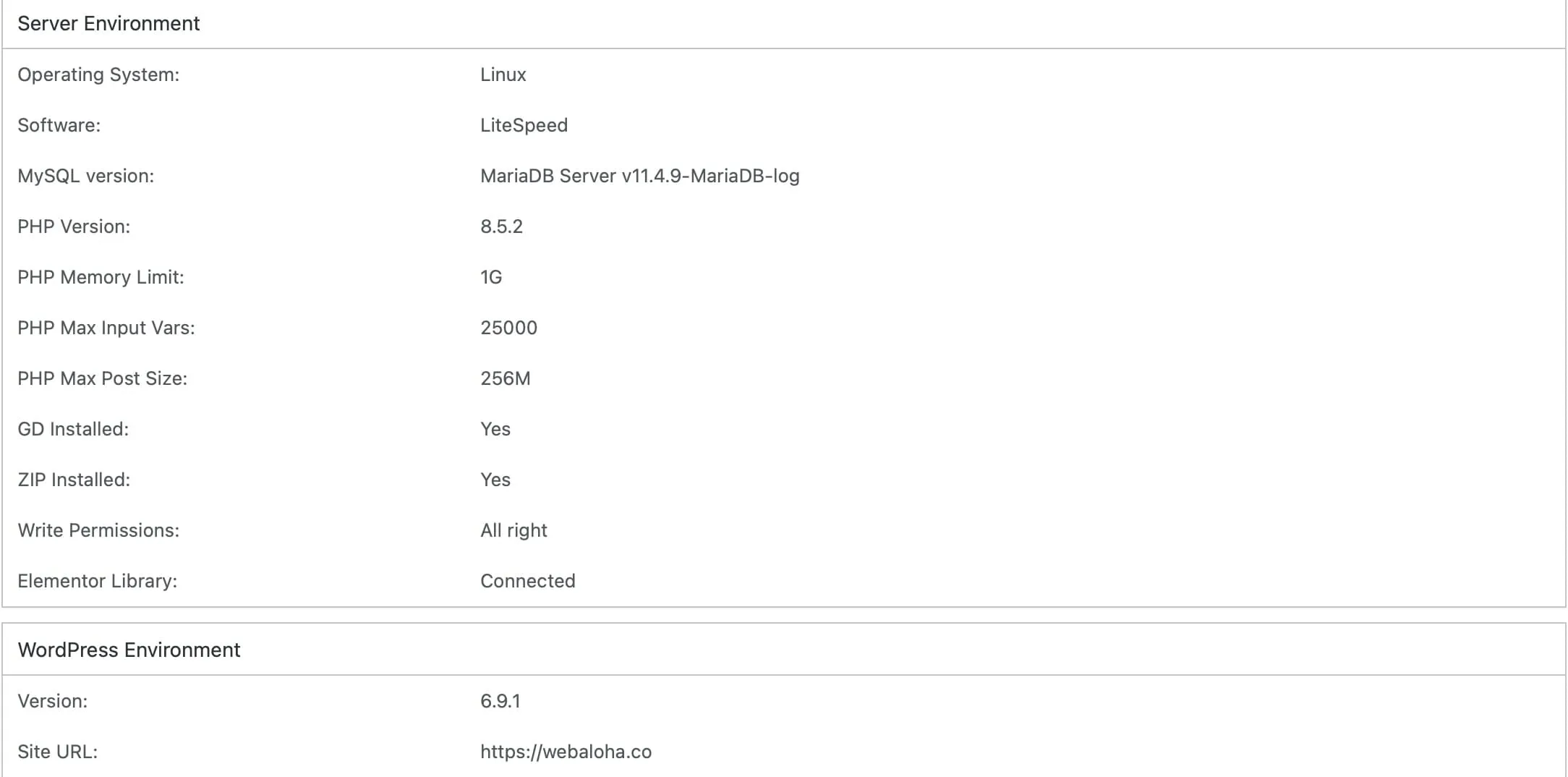
That’s right, Web Aloha’s own website runs on PHP 8.5. So fast, so modern, so secure… 🫦
And not a single fatal error in sight, right? 😎
Below you’ll see more examples of WordPress sites(including WooCommerce stores) running PHP 8.5.
By the way, our Web Aloha team built an Online PHP Version Checker if you want to check a site’s PHP version. It can reveal the PHP version of many websites (if the server allows it). Don’t take our word for it – feel free to double-check the sites we mention. 😏

WordPress Compatibility with PHP 8.5
WordPress 6.x+ is fully compatible with the latest PHP 8.5.2. In fact, it is our recommended php version for WordPress in 2026. But you’re running an older version of WordPress, we highly recommend updating it first before switching to PHP 8.5.
Alright, here are some WordPress websites we’ve moved to PHP 8.5:
WordPress Websites Running on PHP 8.5:
- Web Aloha – The website you’re at right now
- Gavort – Business site, Lithuania
- Wat Pa Tam Wua – Multilingual site, Thailand
- Kikoi Connection – Organisation’s site, UK
- LLL Wellness – Personal site – Indonesia
- Wellington House Repiling – Business site, New Zealand
- Scorpio Agencies – Business site, New Zealand
- Spetsnaz Security UK – Business site, UK
- Balisavana – Business site, Indonesia
Fun fact: less than 0.1% of WordPress developers use the latest PHP. We do. Want to see what plugins and themes any WordPress site is using? Try our WordPress theme and plugin detector.
Need help with your website? Get in touch with Web Aloha – an apex predator in the WordPress jungle. 🦍
WooCommerce Compatibility with PHP 8.5
WooCommerce 10+ is fully compatible with PHP 8.5. If you’re still on WooCommerce 9.x, you’ll be fine, but… wait. Do you hear it? That elephant in the room… quietly whispering: “Update the WooCommerce.”
Talking about Woo payment systems, these are compatible with PHP 8.5:
- Stripe
- Klarna
- Paypal
- Google / Apple Pay
- Opay
- Paysera
We also tested a bunch of extra WooCommerce plugins (see the list below). Our verdict: up-to-date WooCommerce stores are ready for PHP 8.5! Before upgrading, it’s smart to check your SSL certificate and run a redirect check, you don’t want broken payment flows or redirect loops after the switch.
WooCommerce Stores Running on PHP 8.5:
WordPress Plugins + PHP 8.5 Compatibility List
WordPress plugins that we safely run on PHP 8.5 include:
- Activity Log
- Advanced Woo Search
- All in One SEO
- Anti-Spam by CleanTalk
- Bookly WordPress Online Booking & Scheduling
- Cookie Notice & Compliance for GDPR
- Controlled Admin Access
- Elementor / Elementor Pro (read more: Elementor compatibility with PHP versions)
- Extra Custom Product Options For Woocommerce
- Flexible Checkout Fields
- Index WP MySQL For Speed
- JetBackup
- LiteSpeed Cache
- Loco Translate
- Mailpoet
- Ocean Extra
- Opay
- PDF Invoices & Packing Slips for WooCommerce
- Payment Plugins for PayPal WooCommerce
- Paysera
- Polylang
- Product Filter by WBW
- SEOPress
- ShortPixel Image Optimizer
- Site Kit by Google
- Smush
- Sucuri Security
- Tawk.to Live Chat
- Translatepress
- Updraft Plus
- WooCommerce Stripe Gateway
- Wordfence Security
- WP Mail SMTP
- WPVivid
- Yoast Duplicate Post
- Yoast SEO
- 301 Redirects
We’re actively using all these plugins when we provide web design services to our clients worldwide.
By the way, Hello Elementor and OceanWP themes also love PHP 8.5. We love using both on our sites. Curious what fonts a WordPress site is loading? Our website font checker can show you.
Why Updating Your WordPress Site to PHP 8.5?
Speed, safety, updates, future-proofing, flashy numbers, you name it. To put simply, using the latest version of PHP helps you to thrive in a digital jungle. Let’s talk more about it:
PHP 8.5 is the fastest version
We all love fast websites. Seriously, if your site takes more than 2 seconds to load, you start losing visitors. And it’s not the “British scientists” saying it, it’s the Think with Google team.
It matters even more if younger generations are visiting your site. LeZENdary attention spans and all that, you know.
SEO-wise: Google’s Page Experience guidelines say site speed is an important ranking factor. And after doing SEO services for over 8 years, we can totally vouch for it – website speed plays a big role in SEO. Curious how fast your site is right now? Run it through our website performance checker before and after upgrading PHP.
Same goes for AIO – these clever AI agents value fast websites and cite them more often. Want to see how visible your site is to AI search engines? Try our AI search visibility checker.
WordPress + WooCommerce performance on 8.5 vs other versions:
Source: Kinsta PHP benchmarks (Dec 2025). Setup: Docker/GCP, nginx + PHP-FPM, OPcache on, JIT disabled, 15 concurrent users, 1,000 req/run.
Source: 365i PHP benchmarks (Dec 2025): 72-hour production test, 3 websites (vanilla blog, WooCommerce + 2,400 products, Elementor marketing site), PHP 8.3.14 / 8.4.1 / 8.5.0.
PHP 8.5 is the most secure
Updating website’s PHP is like giving your house a fresh set of locks, cameras, and a golden retriever badass guard dog. Old weaknesses get patched, security game goes up, and you keep receiving fixes as new issues show up in the wild.
With PHP 8.5, you’re simply in the “most up-to-date and actively maintained” zone. That’s where you wanna be if you care about good sleep & sanity, amigo. You can also run your site through our security headers checker to see if your server configuration is keeping up with the times.
Once you sit on an older PHP version that’s out of support, you’re basically telling the internet: “Sure, keep trying your luck.” No more official security releases means newly discovered problems may never get fixed on your setup. While you’re at it, check if your DNS is configured properly with our DNS lookup tool, security starts at the foundation. That’s why PHP 8.5 is the safest option right now: it’s current, and actively maintained.
Even security folks keep repeating: staying up to date with PHP helps reduce risk. Sucuri recommends keeping PHP updated, and one of the biggest names in WP security probably knows what they’re talking about, right?
By the way, don’t forget to only enable PHP extensions required by WordPress websites.
Newest PHP version gets active and longer support
When a new PHP version goes stable, it gets two full years of active support (aka the good life). Regular bug fixes, security patches, and additional development. After that, it goes into “security-only mode” for another two years, where updates drop only when something serious needs fixing.
And once those four years are up? That PHP version sells its’ house & moves to Thailand officially retires – no more updates, no more support, kiss kiss adios.
Official PHP version support chart with data from php.net:
| Version | Status | Active support ends | Security fixes until | Known CVEs |
|---|---|---|---|---|
| PHP 8.0 | EOL | Nov 2023 | Nov 2023 | 24+ |
| PHP 8.1 | EOL | Nov 2024 | Dec 2025 | 9 |
| PHP 8.2 | Security only | Dec 2024 | Dec 2026 | 4 |
| PHP 8.3 | Active | Nov 2026 | Dec 2027 | 2 |
| PHP 8.4 | Active | Nov 2027 | Dec 2028 | 0 |
| PHP 8.5latest | Active | Nov 2028 | Dec 2029 | 0* |
CVE counts from php.net security advisories and NVD. EOL versions receive zero patches, any newly discovered exploit is permanently unfixed. *PHP 8.5.0 had 3 CVEs (CVSS 6.5); all patched in 8.5.1. Current release: 8.5.4.
Summary: WordPress is Compatible with PHP 8.5
So yep, WordPress (and WooCommerce) are fully compatible with PHP 8.5. And we didn’t “install WP, activate Twenty Twenty-Six, and call it a day.” We tested it on real, actively used WordPress sites. After upgrading, don’t forget to verify your meta tags and Open Graph tags are still rendering correctly, PHP upgrades occasionally reset caching plugins that affect these.
Need help moving your WordPress site to PHP 8.5? Get in touch with Web Aloha developers.
WordPress & PHP 8.5: FAQ
Is WordPress compatible with PHP 8.5?
Yes. We tested PHP 8.5 on over 50 real WordPress websites – from simple business sites to multilingual WooCommerce stores – and got zero fatal errors. WordPress core handles PHP 8.5 well. The only realistic risk is outdated plugins or abandoned custom code, not WordPress itself. Keep everything updated, test on staging, and you’re good to go.
Which WordPress versions support PHP 8.5?
WordPress 6.9 is the first version with official PHP 8.5 support. If you’re on anything older, update WordPress core first, then switch PHP. Running the latest stable WordPress + updated plugins and theme is what makes the upgrade smooth.
Which PHP version is recommended for WordPress in 2026?
PHP 8.5. It’s the newest stable release, it’s the fastest, and it gets active bug fixes and security patches until the end of 2027. We’re running it on 50+ WordPress sites right now. If your plugin stack isn’t ready yet, PHP 8.4 is a solid fallback – it stays actively supported through late 2026 with security patches until the end of 2028.
Which PHP versions does WordPress support in 2026?
As of 2026, WordPress works with PHP 8.2 through 8.5. Here’s the support timeline: PHP 8.2 gets security patches until the end of 2026, PHP 8.3 until the end of 2027, PHP 8.4 until the end of 2028, and PHP 8.5 until the end of 2029. Anything older than 8.2 is already end-of-life – no patches, no fixes. If you’re still on 8.1 or below, it’s time to move.
Does WooCommerce work with PHP 8.5?
Yes. We manage and host 30+ WooCommerce stores on PHP 8.5 – with Stripe, PayPal, Klarna, multilingual setups, and custom product fields. WooCommerce 10+ handles PHP 8.5 without issues. Just make sure your payment and shipping plugins are up to date, and test checkout flows on staging before switching production.
What is the recommended PHP version for WooCommerce in 2026?
PHP 8.5, same as for WordPress. WooCommerce stores benefit even more from the performance gains since they handle heavier database queries, cart sessions, and payment processing. We run all our managed WooCommerce stores on PHP 8.5 and recommend it as the default for any actively maintained store.
Do WordPress plugins work with PHP 8.5?
Most actively maintained plugins do. We’ve tested a long list across our sites – Elementor Pro, WooCommerce, Yoast, RankMath, WPML, LiteSpeed Cache, and many more – all running fine on PHP 8.5. Breakages usually come from abandoned or poorly coded plugins. Update everything first, check changelogs, and test your critical features before upgrading.
How can I check if my WordPress site supports PHP 8.5?
Create a staging copy of your site, switch it to PHP 8.5, and run through a real checklist: front-end pages, admin, forms, checkout (if WooCommerce), emails, and any API integrations. Check your error logs for warnings or deprecation notices. If everything works and logs are clean, you’re ready to go live. You can also use our WordPress theme and plugin detector to audit your full stack before upgrading.
Should I upgrade my WordPress site to PHP 8.5?
Yes, if your host supports it and your plugins are actively maintained. PHP 8.5 is faster and more secure than any older version, and it gets the longest support window available right now. Update WordPress, your theme, and plugins first, test on staging, then switch. If you rely on old or unmaintained plugins, sort those out before upgrading.
Will upgrading PHP break my WordPress website?
It can, but when it breaks it’s almost always a plugin, theme, or custom snippet – not WordPress core. Typical symptoms: white screen, fatal errors, or parts of the admin not loading. That’s exactly why you test on staging first and check error logs before touching production. Keep a rollback plan ready just in case. After the switch, a broken link check can catch anything that went sideways.
What happens if a plugin is not compatible with PHP 8.5?
Best case: you see deprecation warnings in logs but the site works fine. Worst case: the plugin triggers fatal errors or breaks checkout. Fix options: update the plugin, swap it for a maintained alternative, patch the code, or roll back PHP until the developer pushes a fix. Always have a rollback plan before switching.
How do I upgrade WordPress to PHP 8.5 safely?
Simple process: (1) update WordPress core, theme, and all plugins, (2) create a staging copy, (3) switch staging to PHP 8.5, (4) test critical flows – pages, admin, forms, checkout, emails, (5) review error logs, (6) deploy to production during low-traffic hours, and (7) monitor logs and uptime afterward. If anything goes wrong, roll back immediately and fix the root cause first.