Google Search Console measures your visibility and activity in Google Search; Google Analytics 4 measures collected activity on your website or app. Use Search Console to investigate whether people can find a page and GA4 to examine the visits and useful actions recorded after arrival. Their totals are not expected to match one for one.

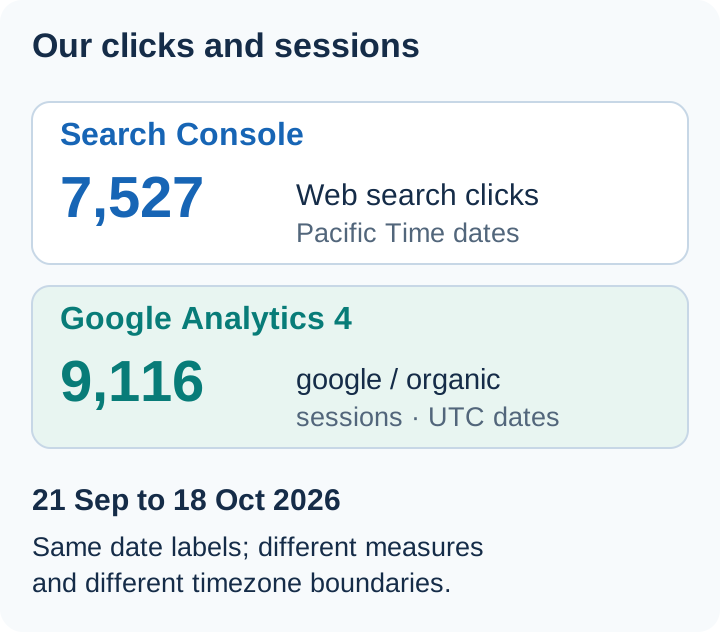
Our own 21 September to 18 October 2026 reports recorded 7,527 Google Search clicks and 9,116 Google organic sessions. The session count was higher even after restricting Analytics to our production hostname. That difference calls for a scoped comparison, not an assumed percentage of lost visits.
A real clicks-versus-sessions comparison
We extracted these own-site aggregates on 29 October 2026 for 21 September to 18 October 2026 inclusive, before the later October spike in PHP-related search traffic.
| Report | Exact scope | Recorded total |
|---|---|---|
| Search Console clicks | URL-prefix property https://webaloha.co/; final Web search data; no dimensions or country, device or query filter | 7,527 clicks |
| GA4 sessions | Session source google, session medium organic, with recorded activity on hostname webaloha.co; no country or device filter | 9,116 sessions |
Both rows use the same 28 calendar-date labels. Search Console dates use Pacific Time; the GA4 response reports UTC. The boundaries therefore cover different instants. The hostname filter excludes recorded activity on translation and preview hosts; it is not a landing-URL-to-canonical join. The GA4 figure is the directly returned aggregate, rather than a sum of daily rows. Its response carried no sampling, thresholding or data-loss warning.
Sessions exceeded clicks by 1,589 in these extracts. When a gap like this needs explaining, check these four sources of extra sessions first:
- Returning visits. GA4 uses the paid and organic last click model for session source, so a visit that starts directly can still be credited to an earlier
google / organicsource without a new Search click. - Other Google surfaces. Google notes that
google / organicin Analytics includes Discover, Image Search and Video Search. Our Search Console row counts Web search only. - Session restarts. A GA4 web session ends after 30 minutes of inactivity by default, so one click followed by a long pause can produce two sessions.
- Date boundaries. Search Console reports in Pacific Time; this GA4 extract reports UTC, so each day starts at a different moment.
Keep the two measures visible and investigate changes in their relationship over time.
A real collection failure: our September CSP fix
Before 16 September 2026, our Content Security Policy blocked Google’s regional Analytics collection endpoints. Search Console kept reporting search activity because its collection does not depend on our on-page Analytics requests. We fixed the policy on 15 September at 19:34 UTC to permit the regional endpoints and added browser checks for collection requests.
That was a website collection failure. It was not evidence that visitors declined consent or that search traffic suddenly grew when Analytics started recording more activity. We treat earlier GA4 data as incomplete and begin comparable reporting on 16 September. The comparison above falls wholly after that boundary.
When Analytics changes sharply after a release, check failed network requests and the deployed policy before treating the movement as an audience change.
Which question belongs in which tool?
| Question | Start here | What the evidence means |
|---|---|---|
| Did Google show this page in results? | Search Console Performance | Recorded impressions under the report’s counting rules |
| Which available search queries led to clicks? | Search Console query report | Returned query rows, with omissions and limits |
| Has Google indexed this exact URL? | Search Console URL Inspection | Google’s recorded indexing state and selected canonical |
| How many visits were recorded from Google organic search? | GA4 traffic acquisition | Collected sessions attributed using the selected session dimensions |
| What did visitors do after arriving? | GA4 pages, events and key events | Measured on-site activity, dependent on implementation |
| Did an enquiry become a qualified lead or customer? | Verified enquiry and sales records, connected to analytics where appropriate | A business outcome beyond a page view or button click |
Google’s guide to using the two products together recommends comparing Search Console clicks with GA4 sessions as related measures while acknowledging that they use different systems.
An impression is not a visit. A click is not a user. A session is not an enquiry. Keep those labels visible in a report instead of calling all of them “traffic.”
A measured example: three Search Console extracts, three totals
We queried the Web Aloha URL-prefix property, https://webaloha.co/, on 28 October 2026 for 28 September to 25 October 2026 inclusive. These are final Web search data, with no country, device or query filter. Dates use Search Console’s Pacific Time boundaries.
| Extraction | Aggregation and scope | Clicks | Impressions |
|---|---|---|---|
| Property total, with no dimensions | One property-level total returned by the API | 68,472 | 823,403 |
| Sum of returned page rows | Page aggregation, including returned fragment URLs | 68,535 | 883,402 |
| Sum of returned query rows | Available query rows, aggregated by property | 30,589 | 438,889 |
These rows are alternative views of the same period. Do not add them together.
The page grouping can count distinct URLs from the same property separately in search results. That is different from property-level counting, as Google’s aggregation documentation explains. The page-row sum above deliberately includes the returned fragment URLs; it is not a count of distinct editorial articles or a separate property total.
The query list is incomplete. Google omits some queries for privacy and limits available rows. The Search Analytics API also explicitly does not guarantee all rows. Pagination can retrieve available pages of results; it cannot recover rows the system does not expose.
This is a separate Search Console aggregation example, from a different period than the clicks-versus-sessions comparison above. Its query-row gap is not a count of missing Analytics visits.
A page can have impressions without a returned query row
For the same 28 September to 25 October 2026 period, our llms.txt guide had 3 page-level impressions and 0 clicks. It had no rows in the available query-page extraction for that period.
The incorrect conclusion would have been “zero query rows means Google never showed this page.” The page report directly contradicted that conclusion. The practical correction was to check page-level visibility before deciding that the article had a discovery or indexing problem.
For comparison, the separate 28 July to 25 October 2026 inclusive page-only extract recorded 29 impressions and 0 clicks for that URL. The 90-day number answers a different date-range question; it should not be placed beside the 28-day query extract as if the periods matched.
Why clicks and sessions differ even with correct tracking
A Search Console click concerns a link in Google Search. A GA4 session groups collected interactions over time. Google’s session documentation explains session starts, timeouts and estimated counts. A new session does not start for every search click.
The following journeys are illustrative explanations, not measured visitor records:
| Journey | Search-side observation | Analytics-side implication |
|---|---|---|
| A link is shown but nobody clicks it | An impression can be recorded under the feature’s rules | The impression itself creates no visit to measure |
| Someone clicks, then leaves before the landing page can collect an event | A click can be recorded | The on-site interaction may not be collected |
| A visitor returns from another search while an existing session remains active | Search activity can occur again | A new click does not necessarily start a new session |
| A visitor arrives from email or another search engine | No corresponding Google Search click is required | GA4 can record a session from that other source |
| A direct search result opens a PDF | Search Console can record search activity for the resource | An ordinary HTML-page tag does not measure a session inside the PDF |
These mechanisms explain why equality is the wrong acceptance criterion. They do not justify ignoring an abrupt tracking change. If the relationship between the reports changes after a deployment, investigate the relevant landing pages and collection behaviour.
Consent is a configuration question, not a fixed correction factor
Consent can affect collection, but its effect depends on the site’s implementation. Basic consent mode can block Analytics tags until consent; advanced mode can send cookieless pings, and eligible reports can include modeled data. Google describes these distinctions in its consent mode reference and consent management introduction.
Our aggregate comparison does not isolate a consent effect. The September incident above was a CSP failure. To establish a separate consent issue, review the actual implementation:
- when the Analytics tag loads and which consent state applies;
- what happens before a choice, after acceptance and after rejection;
- whether page views and relevant key events are collected once under the intended conditions;
- whether a CMP, tag-manager release, browser blocker or content security policy changed collection;
- whether the report includes modeled data or has a data-quality limitation.
Do not multiply sessions by an assumed acceptance rate to make them equal clicks. You need observed collection evidence and a clear definition of the report you are trying to interpret.
Compare equivalent scopes before debugging code
Work through these checks in order:
- Property and pages: confirm that both properties cover the same live website and relevant hosts. A broad Analytics property and a narrow URL-prefix Search Console property are not equal scopes.
- Traffic source: compare Google organic sessions, using session source
googleand session mediumorganic, rather than all sessions or the broader Organic Search channel containing other engines. - Dates: choose the same complete inclusive period. Note the GA4 property’s time zone and Search Console’s Pacific Time dates; boundaries can move events into neighbouring days.
- Search type and filters: label Web, Image, Video or other search data, and align country and device where useful. Do not silently compare different segments.
- URL mapping: Search Console normally assigns performance to the selected canonical, while Analytics measures visited URLs where collection occurs. Review host changes, parameters and alternate paths before joining landing-page rows.
- Freshness and report quality: record extraction dates, incomplete days, missing rows and any displayed data-quality notice.
- Collection: investigate tags, consent, redirects and key events on the landing pages that account for the changed pattern.
Keep the original extracts. If you normalize URLs for a page comparison, preserve a mapping rather than deleting parameters or merging paths indiscriminately. A useful canonical relationship does not mean every URL with a similar spelling represents the same page.
For an affected page, our Google Index Checker can inspect current public technical signals. It cannot diagnose GA4 collection or fetch Search Console metrics. The GSC Opportunity Analyzer helps review exported performance rows, with the same completeness limits as the supplied export.
What linking the products does and does not add
The official Search Console integration brings query and organic landing-page reports into GA4. The query report uses Search Console dimensions; the landing-page report supports compatible page, country and device comparisons.
The link does not turn an aggregate query into a visitor identifier. You cannot infer that a specific person used a hidden query and then submitted a particular form. Keep query-level visibility and landing-page-level outcomes as related but separately measured evidence.
If the linked reports are missing, review the link, permissions, selected web stream and report collection publication using Google’s current instructions. A missing report does not by itself mean the website stopped receiving search visits.
Report decisions, not an unexplained mismatch
A useful monthly review states the Google Search clicks and their exact scope, the comparable GA4 sessions, meaningful collected key events and verified business outcomes separately. If a number is unavailable, leave it unavailable.
Then attach the decision the evidence supports: repair missing collection on a landing page, improve a page that receives relevant impressions, or investigate why recorded visits do not lead to completed enquiries. Avoid calling a hidden query gap a traffic loss or calling a button click a qualified lead.
For setup and indexing reports, use the Search Console guide. For Google AI feature impressions and AI referrals, use the GEO measurement framework, which keeps those sources and outcomes distinct.
Own-site Search Console and GA4 comparison extracted on 29 October 2026. The separately dated Search Console aggregation example was extracted on 28 October. Figures describe recorded activity, with the scopes and collection boundary above.
Frequently asked questions
What is the difference between Search Console and Google Analytics?
Search Console reports how your site is discovered and served in Google Search, including impressions, clicks and indexing information. GA4 measures collected activity on your website or app, including sessions and key events across traffic sources. Use both to connect search visibility with on-site outcomes.
Should Search Console clicks equal GA4 sessions?
No. Clicks and sessions are different units, and collection, consent, attribution, URL handling, filters and time zones can produce differences. Compare equivalent Google organic traffic and investigate a changed pattern rather than forcing totals to match.
Why do my Search Console query totals not match the chart?
Some queries are hidden for privacy and available rows are limited. Page grouping also changes aggregation. A sum of returned query rows is not a complete replacement for a no-dimension property total.
Does linking Search Console and GA4 show conversions for each search query?
The built-in query report shows Search Console query metrics. The landing-page report can show compatible Search Console and Analytics metrics, but the link does not create a visitor-level connection between a specific Google query and an individual conversion.